Most factory dashboards are built for the people who build them. The managing director opens the report, sees nine pages and forty charts, closes it and calls the plant manager instead. In this article I show how I build a CEO dashboard for a factory in Power BI: one page, five numbers, a 13-week trend and a short comment written with AI, where the AI writes sentences but never invents a number.
In 24 years in manufacturing I have built and rebuilt many management reports, and the ones that survived were always the short ones. A top manager does not need more data. They need to know in one minute whether the plant is on track, where it is not, and who is already acting on it. The plant and all numbers below are illustrative, not data from a real company.
The illustrative plant
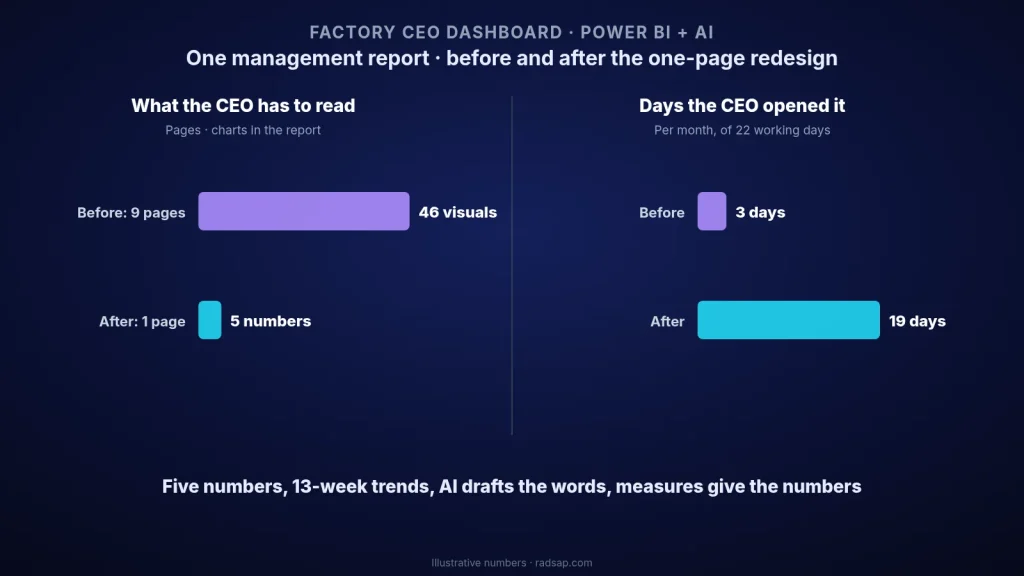
A mid-size plant has a monthly management report in Power BI: 9 pages and 46 visuals, refreshed every night. The usage metrics showed that the managing director opened it on 3 days in a month, always just before the monthly meeting. Every other question went by phone.
When we asked the managing director what they actually wanted to know each morning, the list was short: Are we shipping to customers on time? Is the bottleneck producing to plan? Are we making money on what we produce? Is cash stuck in stock? Is anything wrong with safety or quality? Five questions, five numbers.
The five numbers on page one
| Question | Number | Red when | Owner |
|---|---|---|---|
| Are customers getting their orders? | On-time in-full deliveries (OTIF), last 7 days | Below 92% for one week | Sales and planning lead |
| Is the plant producing to plan? | Bottleneck output vs plan, this week | Below 95% of plan | Production manager |
| Are we making money? | Conversion cost per unit, month to date | 3% above budget | Plant controller |
| Is cash stuck in stock? | Inventory days (raw material, WIP, finished goods) | Above 35 days | Supply chain lead |
| Is anything wrong? | Customer complaints and lost-time incidents | Any lost-time incident, or more than 2 complaints in a week | Quality lead and safety lead |
Your five may be different, but the test is the same: each number answers a question the top manager really asks, has one definition, one owner and a red rule agreed in advance. If a number cannot pass that test, it goes to the second-level page, not to page one.
The layout: one page, read in one minute
- Top row: five cards. Each card shows the current value, the target and a colour from the red rule. No gauges and no 3D charts; a number and a colour are faster to read.
- Under each card: a 13-week trend. One bad week is noise; three bad weeks in a row is a problem. The trend shows the difference at a glance.
- Middle: “What changed this week”. Three to five short sentences: which number moved, why, and what the owner is doing about it.
- Bottom: drill-through, not more charts. A click on a red card opens the plant manager’s page for that number, by line or by product. The top page stays clean.
Where AI really helps in Power BI
AI is useful in three places, and it is risky in one.
- Writing DAX measures from your definitions. Paste the definition from your KPI dictionary and the column names, and ask for the measure. For example, OTIF can come out as
OTIF % = DIVIDE(CALCULATE(COUNTROWS(Shipments), Shipments[OnTime] = TRUE(), Shipments[InFull] = TRUE()), COUNTROWS(Shipments)). Then check it against one week you calculate by hand. If the two do not match, the measure does not go live. - Drafting the weekly comment. If you have Copilot in Power BI (it needs a paid Fabric or Premium capacity), it can summarise the page. If not, export the table of the five measures for the last 13 weeks and give it to ChatGPT or Claude with a prompt like: “Write at most five short sentences for the managing director. Use only the numbers in this table. Name the number that moved most, compared with last week and with the target. Do not guess causes.”
- Answering follow-up questions. With a clean model and clear names (“Bottleneck Output”, not “Measure 7”), the managing director or the plant manager can ask questions in plain language and get a correct visual much more often.
The risky place is the cause. AI can say that OTIF fell from 95% to 88%. It cannot know that it fell because a supplier missed two deliveries. So my rule is simple: AI writes the sentence, the measure gives the number, the owner writes the cause. The owner reads the draft every Monday, corrects it and adds one line on the action. Then it goes on the page.
The data model behind it
A CEO dashboard is only as good as the model under it. Keep it boring: a few fact tables (shipments, production orders, costs, stock, incidents), shared dimension tables for date, product, line and customer, and every KPI as one measure with the same name as in the KPI dictionary. If the data comes from Excel files, clean them first; an hour spent on units, dates and duplicate rows saves weeks of arguments about whose number is right.
How to build it in two weeks
- Day 1–2: the five questions. Sit with the top manager for half an hour and write down the questions they ask every week. Turn each one into a number with a definition, an owner and a red rule.
- Day 3–6: the model and the measures. Connect the sources, build the dimensions and write the five measures with AI help. Test each one against a week calculated by hand.
- Day 7–8: the page. Five cards, five trends, the comment box and the drill-through pages. Show a draft and remove anything the managing director does not look at.
- Day 9–10: the routine. Set the nightly refresh, agree who drafts and who approves the Monday comment, and send the link instead of the old PDF.
In the illustrative plant, the report went from 9 pages and 46 visuals to one page with 5 numbers and three drill-through pages. In the second month, the usage metrics showed the managing director opening it on 19 of 22 working days, and the morning phone calls to the plant manager became questions about actions, not about numbers.
Common mistakes
- Starting from the data you have. Start from the questions; otherwise page one fills with whatever is easy to measure.
- Too many colours. If eight things are red, nothing is. Red needs a rule and a time window.
- Letting AI explain the causes. A confident wrong reason on the top page does more damage than no comment at all.
- Different numbers in different reports. If the finance report and the dashboard show different conversion costs, the meeting is about the reports, not the plant. One definition per KPI, everywhere.
A dashboard like this stands on two foundations I have written about before: one KPI dictionary across plants, so every number means the same thing, and one owner for each KPI, so every red card has someone who acts. If your data still lives in Excel, start with cleaning factory data with Claude for Excel, and for the warning side see exception dashboards that bring bad news early.
Want a one-page dashboard for your own management?
Send me the report your top manager gets today. Together we can pick the five numbers, define them, and build a Power BI page they will actually open every morning.
Contact me Read: who owns each KPI Read: the KPI dictionary
Sources
- Microsoft Learn documents Copilot in Power BI, including its requirement for a paid Fabric or Premium capacity, and the usage metrics report used here to count how often a report is opened.
- OTIF, conversion cost and inventory days are standard manufacturing measures; each plant should fix its own definitions. The plant, thresholds and all numbers in this article are illustrative only.
- Related reading on this site: the KPI dictionary, KPI ownership, Claude for Excel on factory data and exception dashboards.