Run MRP on Monday morning, and by Tuesday noon your planners have already changed a good part of the plan. Dates moved, quantities raised, orders shifted from one machine to another. Most companies see these manual overrides as noise, or as planners who don’t trust the system. I see them as the most honest data a plant has about where the plan and the shop floor disagree.
In 24 years in manufacturing I have rarely met a planner who overrides the ERP for fun. Every change has a reason: a press that cannot run that sequence, a material that is in the system but not on the shelf, a scrap rate everybody knows except the BOM. The problem is that this knowledge lives in the planner’s head and in a private Excel file. When the planner goes on leave, the plant loses it, and the master data never learns anything.
Below is a simple way to log overrides for four weeks and read them as a list of fixes. The plant, the orders and every number in this article are illustrative, not data from a real company.
The illustrative case
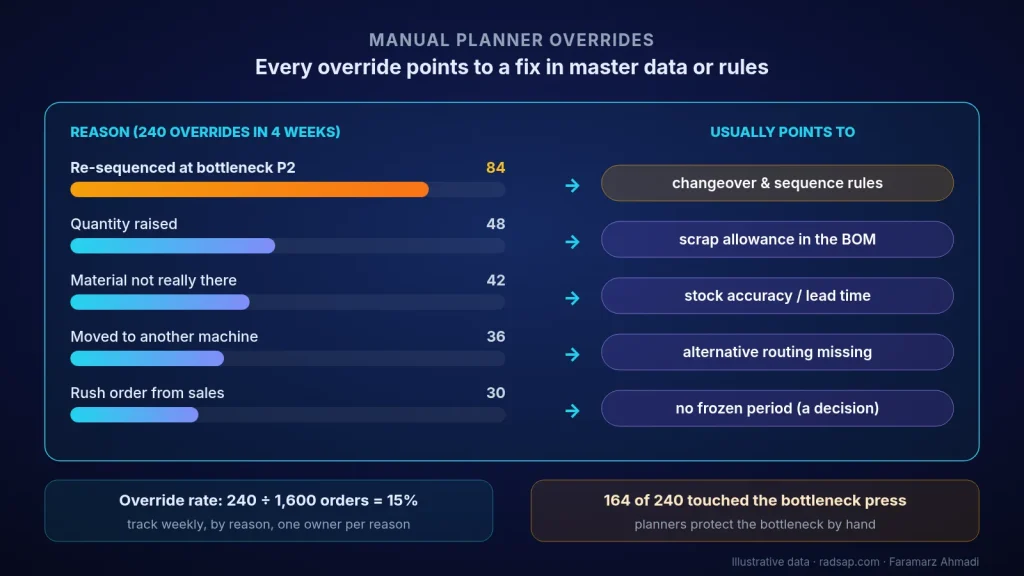
A plant runs MRP every week and releases about 400 production orders. Its bottleneck is a press line, P2. Over four weeks that makes 1,600 planned orders. The planners agreed to log every order they changed by hand after the plan was released. At the end of the four weeks they had logged 240 overrides: 15% of the plan.
Step 1: log every override, with a reason
Keep it to five fields, so that logging one change takes about 20 seconds:
- Order number and work centre.
- What changed: date, quantity, sequence or machine.
- From and to (for example 12 Oct → 15 Oct, or P2 → P3).
- One reason from a short code list (five or six codes are enough), plus “other” with a note.
- Who changed it.
If your ERP already keeps a change log, use it, but add the reason. The change log tells you what changed; only the planner can tell you why. At 20 seconds each, 240 overrides cost the team about 80 minutes over four weeks.
Step 2: say clearly that this is not a performance check
If planners think the log will be used against them, they will stop overriding on paper and keep doing it by phone. So I tell them at the start: the target is not zero overrides. The target is that nobody has to make the same override every week.
Step 3: group by reason and by work centre
| Reason (illustrative) | Overrides | Share | What it usually points to |
|---|---|---|---|
| Re-sequenced at the bottleneck press to group changeovers | 84 | 35% | Changeover and sequence rules the ERP doesn’t know |
| Quantity raised (extra pieces added) | 48 | 20% | Scrap allowance in the BOM too low |
| Start moved later: material not really there | 42 | 17.5% | Stock accuracy or purchase lead time in the material master |
| Moved to another machine | 36 | 15% | Alternative routing missing from master data |
| Rush order pushed in by sales | 30 | 12.5% | No frozen period or priority rule (a decision problem, not data) |
| Total | 240 | 100% |
The few “other” lines were read and recoded, so the table has five groups. Two things stand out. First, 164 of the 240 overrides, about two thirds, touched the bottleneck press P2. The planners were protecting the bottleneck by hand, which is exactly what they should do, but the system doesn’t know it. Second, only 30 overrides, one in eight, came from sales priorities. The other 210 point at master data or at rules the ERP simply doesn’t have.
Step 4: read each group as a question
Re-sequencing at the bottleneck (84). The ERP plans P2 as if every changeover took the same time. In reality, going from thin to thick sheet is quick and going back is slow, so the planners group orders by hand. Either put a simple changeover matrix into the scheduling rules, or accept sequencing as the planner’s job and stop counting it as an error. Both are fine; pretending it doesn’t happen is not.
Quantity raised (48). The BOM has a 2% scrap allowance, but actual scrap on these items is about 6%. For an order of 500 good pieces, the system plans 510 starts, which gives only about 479 good ones (510 × 0.94). A planner who knows this raises it to 532 (500 ÷ 0.94 ≈ 532). The fix belongs in the master data, not in the planner’s memory.
Material not really there (42). Either the stock figure is wrong, or the purchase lead time in the material master is too short. In the example, the system says 10 working days, while the last 20 deliveries took 16 on average. Every order planned on 10 days will be moved by hand.
Moved to another machine (36). The routing has only one machine, so whenever P2 is full, the planner moves the work to P3 outside the system. Adding the alternative routing turns a weekly workaround into a normal planning option.
Rush orders (30). This is not a data problem. It is a missing rule: a frozen period in which the plan doesn’t change without a named decision by a named person. Here the conversation is with sales, not with the ERP team.
Step 5: fix one reason, then watch its count
Pick the group that is cheapest to fix and touches the bottleneck. In the illustrative case that was the scrap allowance: correcting it on the 12 items behind most quantity changes took process engineering two days. In the next four weeks, quantity overrides fell from 48 to 15. Then move on to the next group.
One number to keep: the override rate
Override rate = orders changed by hand after release ÷ orders in the plan. In the example, 240 ÷ 1,600 = 15%. Track it every week, split by reason code, and give each reason one owner: scrap allowances and routings to process engineering, lead times to purchasing, sequencing to planning, and the frozen period to planning and sales together. Write the definition once in your KPI dictionary, so nobody argues later about what counts as an override.
If master data ownership is the bigger problem in your plant, I wrote about it in master data ownership before ERP–MES integration. And if you are not yet sure where your bottleneck is, start with how to find and open a production bottleneck with data.
Checklist before you start logging overrides
- A short reason list agreed with the planners, plus “other”.
- Five fields per override, about 20 seconds each.
- Planners told clearly that this is not a performance check.
- Four weeks of logging before any conclusion.
- Overrides grouped by reason and by work centre, with the bottleneck marked.
- Each reason turned into one master data or rule question, with one owner.
- One fix at a time, and that reason’s count watched for the next four weeks.
Want to look at your own overrides?
Send me four weeks of plan changes, from the ERP change log or even the planners’ Excel file, with order numbers anonymised. We can group them together, see how many touch your bottleneck, and leave you with a reason list and the three master data fixes worth doing first.
Contact me Read: find the bottleneck Read: KPI dictionary
Sources
- Bottleneck logic follows the Theory of Constraints idea that the slowest step sets the pace of the whole system and has to be protected (Eliyahu M. Goldratt, The Goal, 1984).
- “Frozen zone” and “planning time fence” as defined in the ASCM (APICS) Dictionary. The plant, the orders and all numbers in this article are illustrative only.
- Related reading on this site: finding a production bottleneck with data, master data ownership before ERP–MES integration, and the KPI dictionary.