Ask ChatGPT for a weekly production plan and you get a tidy table in seconds: every day balanced, every order placed. The trouble is that a plan can look balanced in pieces and still be impossible at one machine. That one machine is the bottleneck, and ChatGPT will not see it unless you put it in the data.
In 24 years in manufacturing I have seen many weekly plans fail on Wednesday for the same reason: they were built on order counts, not on hours at the step that limits output. Below is the simple Excel method I use with ChatGPT to build a weekly plan that respects the bottleneck. It continues my earlier article on ChatGPT prompts for a production manager. The plant and every number here are illustrative, not data from a real company.
The illustrative case
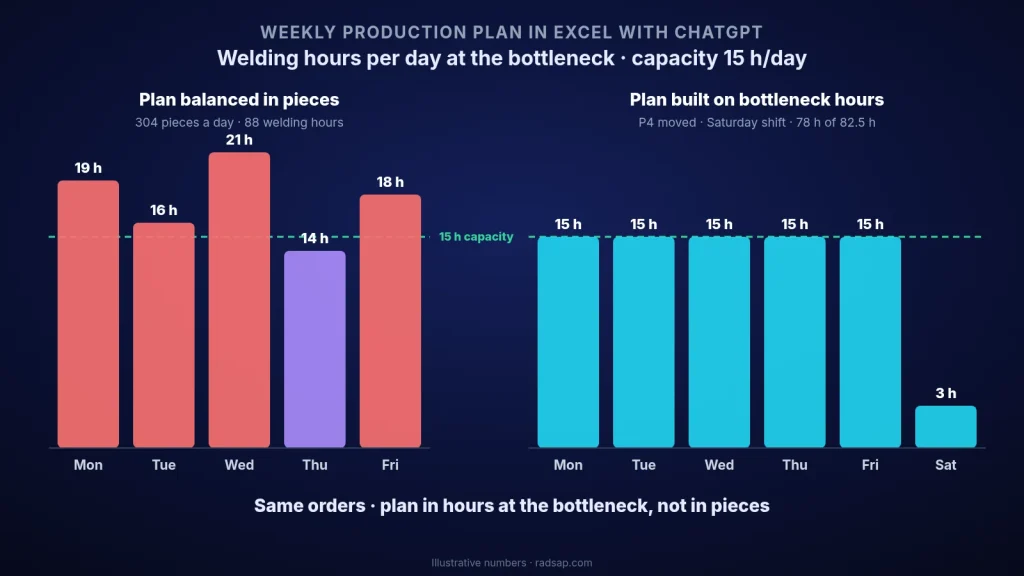
A small metal plant makes four products, P1 to P4, through three steps: cutting, welding and painting. This week it has 1,520 pieces to make. Welding runs two shifts of 7.5 hours, so it has 15 hours a day and 75 hours a week.
The planner pasted the order list into ChatGPT and asked: “Make a weekly production plan, Monday to Friday, balanced across the days.” The answer looked perfect: about 304 pieces a day. But nobody had told ChatGPT that a P3 piece takes 9 minutes of welding and a P4 piece takes only 1.2 minutes. Measured in welding hours, the same plan asked for 14 to 21 hours a day, 88 hours in total, from a station that has 15. By Friday about 13 hours of welding work were still waiting, and two orders slipped into the next week.
ChatGPT did exactly what it was asked. The question was wrong, not the tool.
Step 1: three small tables in Excel
Before asking ChatGPT anything, I put the plan’s raw material into three Excel tables:
- Orders: product, quantity, due date. P1 400 pieces, P2 300, P3 120, P4 500.
- Routing: minutes per piece at each step. For welding: P1 6, P2 4, P3 9, P4 1.2 minutes.
- Capacity: available hours per step per day, after breaks and planned maintenance, not the calendar hours.
This is the part most people skip, and it is the part that matters. If the routing times are old or wrong, no AI will fix the plan. I wrote about this in why planners override the system.
Step 2: load per step, before any sequencing
Now I ask ChatGPT for a formula, not a plan: “In my Orders table, add a column with welding hours per order, using the welding minutes from the Routing table.” A good answer is a helper column like this:
=[@Qty]*XLOOKUP([@Product],Routing[Product],Routing[Weld min])/60
The same for cutting and painting. Summing each column gives the weekly load per step:
- Cutting: about 38 hours against 75 available, 50% load.
- Painting: about 45 hours against 75, 60% load.
- Welding: 40 + 20 + 18 + 10 = 88 hours against 75, 117% load.
Welding is the bottleneck, and at 117% no clever sequence can make this week fit. That is a management decision, not a planning trick.
Step 3: decide the gap first, then plan
The gap is 13 welding hours. In this example there are two honest options: one extra Saturday shift in welding (+7.5 hours) and moving P4, which is due next Wednesday, to next week (−10 hours). Together they bring the welding load to 78 hours against 82.5 available, about 95%. I keep that small buffer on purpose: a plan at 100% of the bottleneck breaks with the first breakdown.
ChatGPT is useful here as a calculator for options: “If I add one Saturday shift and move P4, what is the welding load in %?” It is not the one who decides which customer waits.
Step 4: sequence the bottleneck, and let the other steps follow
Only now do I sequence, and only at the bottleneck. I sort the orders by due date and add a cumulative welding-hours column. The day number is then a simple formula:
=ROUNDUP([@[Cum weld h]]/15,0)
Day 1 is Monday, day 6 is Saturday. Large orders are split across days where the cumulative hours cross a day boundary. Cutting is planned one day ahead of welding, so welding never waits for material, and painting follows welding. Both have spare capacity, so they do not need their own clever sequence.
Step 5: let ChatGPT check the plan, not just write it
The last prompt is a check: “For each day, sum the welding hours in this plan and flag any day above 15 hours (Saturday 7.5).” In the new plan Monday to Friday are at 15 hours and Saturday at 3. Nothing is flagged, and the other 4.5 hours of the Saturday shift are the buffer for a breakdown during the week.
The prompts I keep for this:
- “Here are my Orders, Routing and Capacity tables. Calculate the load per step in hours and % for this week. Do not make a plan yet.”
- “Which step is above 90% load? List the options to close the gap, with the hours each one gives.”
- “Write an Excel formula that assigns each order to a day by cumulative hours at the bottleneck, with 15 hours per day.”
- “Check this plan: daily hours per step against capacity. Flag every overload.”
Want to try this on your own weekly plan?
Send me one week of orders, your routing times and the shift pattern, even without product names. We can find the real bottleneck, see the load in hours and build a weekly Excel plan that your planner can update in a few minutes.
Contact me Read: find the bottleneck Read: capacity load board
Sources
- Planning to the constraint follows the Theory of Constraints (E. M. Goldratt, The Goal): the bottleneck sets the output of the whole plant, so it is scheduled first and protected with a buffer.
- Load versus capacity in hours is the standard rough-cut capacity check used in master production scheduling. XLOOKUP and structured table references are standard Microsoft Excel functions. The plant and all numbers in this article are illustrative only.
- Related reading on this site: ChatGPT prompts for a production manager, planner overrides and master data, the capacity load board and finding the bottleneck.