Paste a month of downtime records into ChatGPT, ask “what is our main cause of downtime?”, and you will get a confident answer in seconds. In most plants that first answer points at the wrong problem. Not because the tool is bad, but because the question and the data are.
In 24 years in manufacturing I have seen the same downtime log tell three different stories, depending on how you count. Count the stops and the small jams win. Count the minutes and material waiting wins. Count only the minutes that cost the whole line its output, and something else entirely comes to the top. ChatGPT is a fast way to get through that log, as long as you ask it the questions in the right order.
Below is that order: five questions that take a raw downtime log to the one loss worth fixing first. The line, the log and every number in this article are illustrative, not data from a real plant.
The illustrative log
A machining line has five stations. Station CNC 3 is the bottleneck, with a cycle time of 90 seconds. In one month the operators logged 247 stops and 2,890 minutes of downtime. The reasons were typed by hand, so the same cause appears under different names: “no material”, “waiting for parts”, “material late”. And 58 stops simply say “Other”.
Question 1: the one everyone asks first
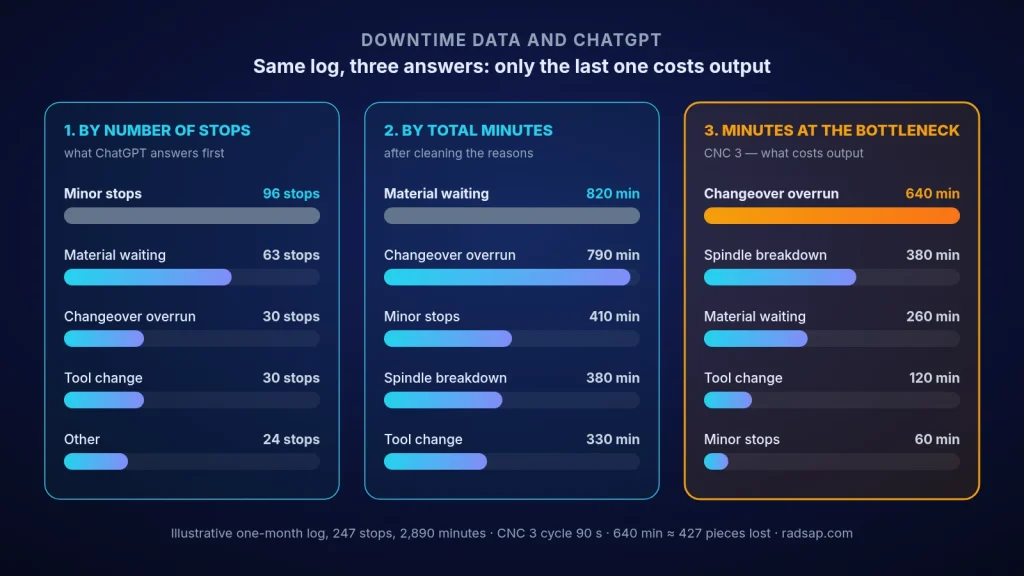
The typical answer: minor stops (sensor faults and jams), with 96 of 247 stops. It is true, but it is the least useful answer in the log. Without being told otherwise, the tool counts events, and the most frequent stops are usually the shortest. Keep that answer; we will come back to it.
Question 2: clean the reasons before you count anything
This is the step most people skip, and it changes everything. The three material labels become one code. When the notes are read, 22 of the 58 “Other” stops turn out to be material waiting, and 12 are changeovers that ran past the standard time. Only 24 are truly unclassified. Have a supervisor check the “unsure” lines; ten minutes of human review here is worth more than any chart later.
| Cause (after cleaning, illustrative) | Stops | Minutes | Minutes at CNC 3 (bottleneck) |
|---|---|---|---|
| Minor stops (sensors, jams) | 96 | 410 | 60 |
| Material waiting | 63 | 820 | 260 |
| Changeover overrun | 30 | 790 | 640 |
| Tool change | 30 | 330 | 120 |
| Spindle breakdown | 4 | 380 | 380 |
| Other (still unclassified) | 24 | 160 | 40 |
| Total | 247 | 2,890 | 1,500 |
Question 3: rank by minutes, not by count
Now material waiting leads with 820 minutes, closely followed by changeover overrun with 790. Minor stops, the “winner” of question 1, drop to third place, only just ahead of the spindle breakdown. This is already a better picture, but it is still not the one that matters for output.
Question 4: only the bottleneck’s minutes cost the whole line
Here the real answer appears: changeover overrun, with 640 minutes at the bottleneck. That is 38,400 seconds, or about 427 pieces the line could have made in the month (38,400 ÷ 90). The spindle breakdown comes second with 380 minutes. Most of the material waiting happened at other stations while the buffer in front of CNC 3 kept it running, so it cost far less output than its total minutes suggest. Always check the arithmetic yourself, and ask for the calculation every time. This is the same logic I use in how to find and open a production bottleneck with data.
Question 5: find the pattern and turn it into one test
In the illustrative log, about two thirds of the overrun minutes come from the night shift, on changeovers to one product family. That is not a conclusion; it is a place to go and look. Maybe the fixture for that family is not prepared in advance, maybe the night shift has no setup specialist. One test with one owner for two weeks, such as preparing the fixture and tools before the changeover starts, will tell you more than another month of charts.
Why the first answer was wrong
ChatGPT did exactly what it was asked. “Main cause” without a definition means “most frequent”, and messy labels hide the real size of each cause. The fix is not a better AI tool. It is a short code list, a human check on the uncertain lines, and one question that ties every lost minute to the bottleneck.
If the breakdown line had come out on top, the next step would be different, and I describe it in predictive maintenance for one critical asset. And for the daily version of these questions, from shift report to morning meeting, see 5 ChatGPT prompts for a production manager.
Checklist before you trust a downtime analysis
- Confidential data removed; company rules on AI tools followed.
- Reasons mapped to a short code list; the original text kept next to it.
- “Other” read and reclassified; uncertain lines checked by a supervisor.
- Causes ranked by minutes, not only by number of stops.
- Minutes at the bottleneck separated and turned into lost pieces.
- Every calculation shown and checked once against the raw log.
- One hypothesis, one test, one owner, a two-week deadline.
Want to try this on your own log?
Send me one month of anonymised downtime records. We can run these five questions together, see whether the cause everyone talks about is really the one costing output, and leave your team with a code list and prompts that fit your line.
Contact me Read: find the bottleneck Read: live operations dashboard
Sources
- Bottleneck logic follows the Theory of Constraints idea that the slowest step sets the pace of the whole system (Eliyahu M. Goldratt, The Goal, 1984). The log and all numbers in this article are illustrative only.
- Related reading on this site: finding a production bottleneck with data, ChatGPT prompts for a production manager, predictive maintenance for one critical asset, and live operations dashboards.