On most production lines, the last check before packing is still a person looking at parts under a lamp. It works well in the first hour of a shift and much less well in the seventh. AI visual inspection, a camera plus an image model that flags defective parts, is now cheap enough for a mid-sized factory to try. In this article I show the practical path I follow, from the first camera image to a decision the line actually uses.
In my 24 years in manufacturing I have seen vision projects fail for reasons that had nothing to do with the AI model: bad lighting, no agreed definition of a defect, or nobody deciding what happens to a part the camera rejects. So most of this article is about those things. The line and all numbers below are illustrative, not data from a real company.
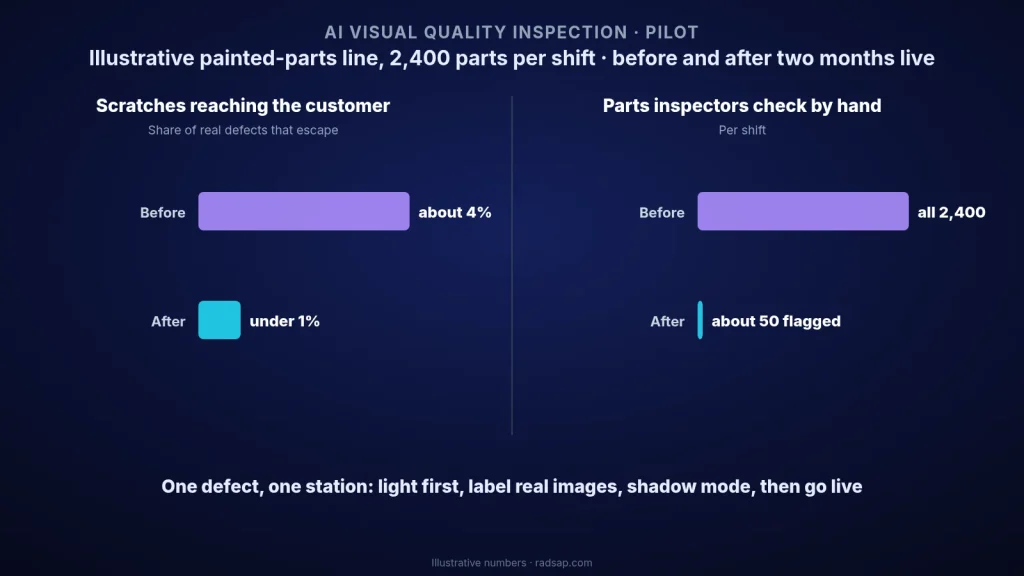
The illustrative line
A plant makes painted sheet-metal covers, about 2,400 parts per shift. Two inspectors check every part at the end of the line for scratches, dents and paint runs. Audits of packed parts show that about 4% of real defects still reach the customer, and most of those escape in the second half of the night shift. The quality manager wants to know if a camera can help, without stopping the line or buying an expensive turnkey system first.
Step 1: pick one defect and one station
Do not start with "inspect everything". Pick the one defect that costs the most, from your complaint and scrap records, and the one station where the part sits still or moves at a steady speed. In the example that is paint scratches on the top face, which cause most of the customer returns. One defect, one face, one station. If that works, adding the next defect is much easier.
Step 2: lighting and camera before any AI
This is where I spend the most time, and it pays back more than any model choice.
- Fixed, controlled light. A simple enclosure or hood over the station, so daylight and the lamp next door do not change the image. For scratches on shiny paint, light from a low angle makes them stand out.
- Fixed camera position. Same distance and angle for every part. An industrial camera is best, but for a first test a good fixed USB camera is often enough.
- A trigger. Take the image when the part is in place, from a sensor or the conveyor signal, not on a timer.
A useful test: if an experienced inspector cannot see the defect clearly on the screen image, no model will find it reliably either. Fix the image first.
Step 3: collect and label images
- Write the defect definition on one page. With photos: what counts as a scratch, what minimum length, which areas of the part matter. Two inspectors must agree on it, otherwise the labels will contradict each other.
- Collect real images for two to three weeks. In the example: around 3,000 good parts and 300 with scratches. Good parts are easy to collect; defect images take time, so keep every rejected part and photograph it.
- Label them with the inspectors. Free labeling tools are enough. The inspectors know the defects better than anyone; this step also gets them on your side.
- Keep a separate test set. Put aside a week of images the model never sees during training. That is the only honest way to judge it.
Step 4: start with a simple model
For a single defect, a standard image classifier ("good" or "scratch") trained on your images is usually enough, and many tools now do this without much code. If you have very few defect images, an anomaly-detection model that learns only what a good part looks like and flags anything different is a good first option. Do not buy a complicated system before this simple test shows the defect can be seen.
Step 5: decide the trade-off between false rejects and misses
Every model makes two kinds of error: it rejects good parts (false rejects) or it passes bad parts (misses). You cannot drive both to zero, so this is a management decision, not a technical one.
| Setting | Misses (defects passed) | False rejects (good parts stopped) | What it means on the line |
|---|---|---|---|
| Strict | About 1% | About 6% | Very few escapes, but an inspector rechecks around 140 good parts per shift |
| Balanced | About 2% | About 2% | Around 50 rechecks per shift; the choice in the example |
| Loose | About 6% | Under 1% | Hardly any rechecks, but worse than the people it was meant to help |
In the example, the camera does not replace the inspectors. It stops the doubtful parts, and an inspector makes the final call on those. That way a false reject costs a few seconds, not a scrapped part.
Step 6: run in shadow mode, then go live
For the first two to four weeks the camera only records its decision and nobody acts on it. Each day, compare its calls with the inspectors' calls and look at every disagreement. Only when the numbers hold on new parts and on night shifts does the camera start stopping parts. In the illustrative line, after two months live, scratches reaching the customer fell from about 4% of defects to under 1%, and the inspectors' time went to checking flagged parts instead of every part.
Where it pays first
- A defect that is visible, costly and frequent: surface scratches, missing parts, wrong labels, seal or weld appearance.
- A station where the part is already still or moves at a steady speed.
- Night shifts and long shifts, where human attention drops the most.
- Parts where images are also useful later, for example to settle a customer claim or trace a defect back to a process step.
Common mistakes
- Starting with the model. Most failures are lighting, positioning and unclear defect definitions.
- Too few defect images. A model trained on 20 scratches will not be reliable. Collect for longer or start with anomaly detection.
- No plan for rejected parts. Decide in advance who checks them, where they go and how fast.
- Never retraining. A new paint supplier or a new part version changes the images. Keep labeling a sample every month.
Vision inspection fits well with other work I have written about: choosing the first applied AI use case in manufacturing, making sure an AI pilot actually reaches the shop floor, and predictive maintenance on one critical asset, which follows the same "start small" logic.
Want to test visual inspection on your line?
Send me a short description of the defect that costs you the most and a few sample photos. Together we can check whether a camera can see it and plan a small, low-cost pilot.
Contact me Read: applied AI in manufacturing Read: why AI pilots stall
Sources
- Camera-based inspection with image classification and anomaly detection is widely used for surface defects in automotive, metal, plastics and packaging; results depend heavily on lighting, image quality and labeled data.
- The line, error rates and all numbers in this article are illustrative only.
- Related reading on this site: applied AI use cases, why AI pilots stall, and predictive maintenance on one critical asset.