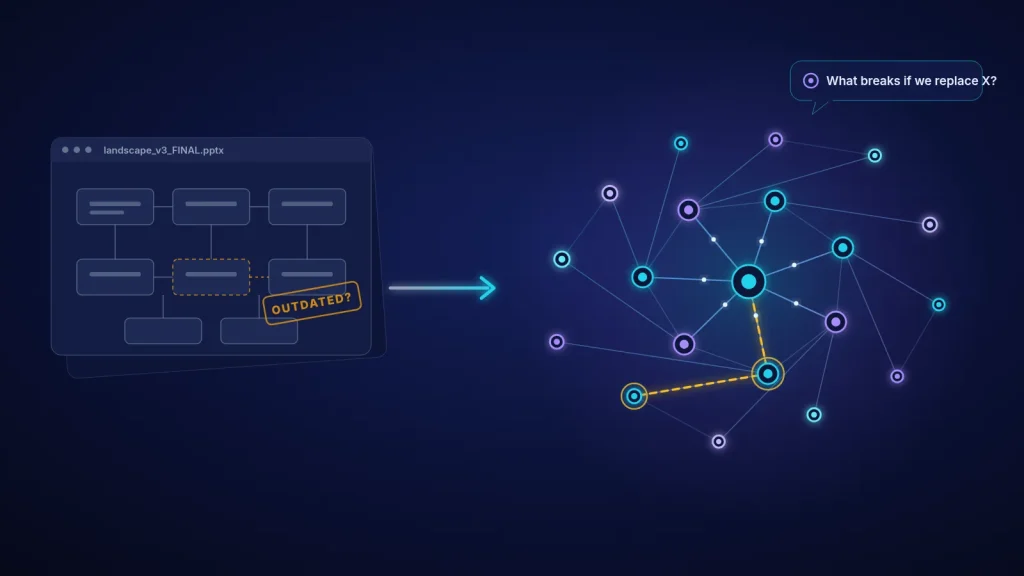
Somewhere in your company there is a slide called something like landscape_v3_FINAL.pptx. It has neat boxes, a few arrows, and a logo of a system you switched off two years ago. Everyone knows it is not quite right. Nobody knows exactly which part is wrong. And that slide is what the next ERP or AI project will be planned on.
In my 24 years in manufacturing and industry, I've seen architecture diagrams that were out of date the week they were drawn. Not because the people who drew them were careless, but because a drawing is a photograph and a company is a moving thing. A new interface goes in on a Friday night, a department buys a cloud tool with a credit card, someone writes a small script that copies orders from one database to another, and the picture quietly stops being true.
The cost shows up later, usually at the worst moment: an ERP cut-over that breaks a label printer nobody had listed, an AI pilot that turns out to need data from a system with no owner, a "simple" upgrade that stops invoices for a week. Decisions get made blind, and then everyone is surprised.
What has actually changed in 2025–2026
For years the honest answer to "keep the architecture up to date" was "hire more architects and nag people." That is changing, and not just in marketing slides.
- The repository is becoming a graph, not a drawing. Modern EA tools store applications, data, processes and owners as connected objects, so a "diagram" is just one view generated from the model. Ardoq, for example, describes its platform as an enterprise architecture knowledge graph and has added AI that turns imported Lucidchart diagrams into structured model elements.
- AI assistants sit on top of the model. SAP LeanIX now ships an Enterprise Architecture Assistant that answers natural-language questions from your own inventory and decision log, and it proposes changes for review instead of silently writing them. Both vendors also expose their data to outside AI tools through MCP servers (the Model Context Protocol).
- The analysts treat AI as a core capability now. Gartner's 2025 Magic Quadrant for Enterprise Architecture Tools evaluates "AI assistant" and AI-assisted architecture development as part of the critical capabilities, next to the usual repository and modelling features.
You don't need any particular product to benefit from this. The idea underneath is simple: stop drawing the architecture and start recording it, keep the record fed automatically, and let a language model help people ask questions of it.
A practical method: from a static slide to a living model
Picture a mid-sized manufacturer with one ERP, a warehouse system, a small MES on two lines, a quality database, a CRM and a few dozen smaller tools and spreadsheets. Management wants to replace the old warehouse system next year and start an AI forecasting pilot. Here is how I would turn their landscape slide into something they can trust.
- Start from one decision, not from "document everything". Pick the decision that is coming anyway, here "replace the warehouse system". The model only has to be good enough to answer the questions that decision raises. You can widen it later.
- Harvest the inventory from what already exists. You rarely start from zero. The single sign-on or identity system knows which applications people log into. Finance knows which licences and subscriptions you pay for. The ERP has a list of interfaces and batch jobs. The integration middleware or file-transfer server has logs of what moves where. Even the old Visio and PowerPoint files are useful as raw material. This is where an LLM earns its keep early: give it the contracts, interface documents and old diagrams, and ask it to extract a candidate list of systems and data flows with the source of each line. A person then confirms or rejects each item. The machine drafts, people decide.
- Agree a tiny metamodel. Five element types and a handful of relationships are enough to start. I like borrowing names from ArchiMate, The Open Group's modelling language, so the model can grow into a proper EA tool later without renaming everything.
- Put it in a store that understands relationships. That can be an EA tool, a graph database, or honestly, to begin with, two well-kept tables: one for elements and one for relationships. What matters is that every flow is a record with a source, a target, an owner and a "last confirmed" date, not a line on a picture.
- Feed it automatically, then measure freshness. Connect the sources from step 2 so new applications and interfaces show up on their own: a weekly import of the SSO app list, the integration logs, the licence list. Every element whose "last confirmed" date is older than, say, 90 days goes onto its owner's to-do list. That freshness number is the heartbeat of a living model.
- Let an LLM answer impact questions, grounded and read-only. Now the fun part. Connect a language model to the model data (through the vendor's assistant, an MCP server, or a simple retrieval setup) and ask plain questions: "What breaks if we replace the warehouse system?", "Which systems hold customer data?", "What would the forecasting pilot need to read, and who owns it?" Insist on two rules: every answer must point to the actual elements it used, and the AI never writes to the model without a human approving it.
- Use it in real meetings. A model nobody looks at dies. Make the impact view part of every change or investment discussion, so people have a reason to keep their part correct.
Example starter metamodel
| Element type | Key fields | Typical automatic feed |
|---|---|---|
| Application | Name, owner, vendor, lifecycle (live / phase-out) | SSO app catalogue, licence list |
| Interface / data flow | Source, target, data carried, frequency, technology | Integration / file-transfer logs, ERP interface list |
| Data object | Name, sensitivity, system of record | Database catalogue, data-protection register |
| Business process | Name, process owner, supporting applications | Process maps, workshops |
| Owner | Person or team, contact | HR / directory |
Example impact question: "What breaks if we replace the warehouse system?"
With even a rough living model, the assistant can return something like the table below in seconds, each line linked to the record it came from. All entries are illustrative.
| Dependent flow | Direction | Owner | Last confirmed | Risk |
|---|---|---|---|---|
| ERP sales orders → warehouse picking lists | In | Logistics | 3 weeks ago | High |
| Warehouse → shipping label printer service | Out | none recorded | 14 months ago | High, no owner |
| Warehouse stock levels → nightly Excel export for planning | Out | Planning | found by log import | Medium, undocumented |
| Quality hold status → warehouse block flag | In | Quality | 2 months ago | Medium |
Look at the two middle rows. A flow with no owner and a flow nobody had documented. Those are exactly the things that break during a cut-over and get blamed on the new system. A static slide would never have shown them; a model fed by logs and kept honest by a freshness check does.
The payoff
The real value is not a prettier picture. It is that you can answer the boring, expensive questions before you sign the contract: what depends on this, who owns it, which data it touches. ERP and AI projects stop colliding with integrations that "nobody knew about". New managers understand the landscape in an afternoon instead of a quarter. And when someone asks where AI is already being used in the company and what data it sees, you have an answer instead of a guess.
The same thinking sits behind my earlier note on moving from spreadsheet chaos to one live dashboard: one trusted, current picture beats ten polished but stale ones. And if you've read why OEE gains don't always reach profit, you'll recognise the pattern: local improvements fail when you can't see the whole system.
A short checklist to start this month
- Name one upcoming decision the model must support (ERP change, system replacement, AI pilot).
- Collect three existing sources: SSO app list, licence list, ERP or middleware interface list.
- Let an LLM draft the inventory from those sources and old diagrams; have owners confirm each line.
- Fix a five-type metamodel and give every element an owner and a "last confirmed" date.
- Automate at least one feed and track the share of elements confirmed in the last 90 days.
- Ask your first impact question with a grounded, read-only assistant and check every cited element.
- Bring the impact view to the next change or investment meeting.
Want a landscape you can actually trust?
If your next ERP, digital or AI project is being planned on a slide nobody quite believes, I'd be glad to help. We can choose the first decision to support, set up a lean metamodel, connect the sources you already have and get your first impact questions answered, without a year-long programme.
Contact me Read: one live dashboard
Sources
- Gartner (6 Oct 2025). Magic Quadrant for Enterprise Architecture Tools, with the companion Critical Capabilities report covering intelligent automation, augmented architecture development and AI assistants.
- SAP LeanIX (2026). AI Enterprise Architecture Assistant: now included in SAP LeanIX. Natural-language answers grounded in the inventory; proposed changes reviewed before update.
- Ardoq (2025). Q2 AI Roundup: Innovations Shaping the Next Era of EA. MCP support and AI import of Lucidchart diagrams into structured architecture.
- The Open Group. ArchiMate® 3.2 Specification. Element and relationship names for the starter metamodel.