In most factories and offices the answer already exists somewhere: in a work instruction, a maintenance manual, a quality procedure or an old email. The problem is finding it. A technician waits at a stopped machine while someone searches a shared drive, and a new planner asks the same question a senior colleague has answered twenty times.
In my 24 years in industry I've seen how much time disappears into this kind of searching, and how much knowledge leaves the company when experienced people retire. Today there is a practical way to attack this problem with AI: an internal assistant that answers questions only from your own documents and shows where each answer comes from. The technical name is retrieval-augmented generation, or RAG.
In this article I'll explain how it works in plain language, walk through a worked example with numbers, and give you a step-by-step plan and checklist for a small first pilot.
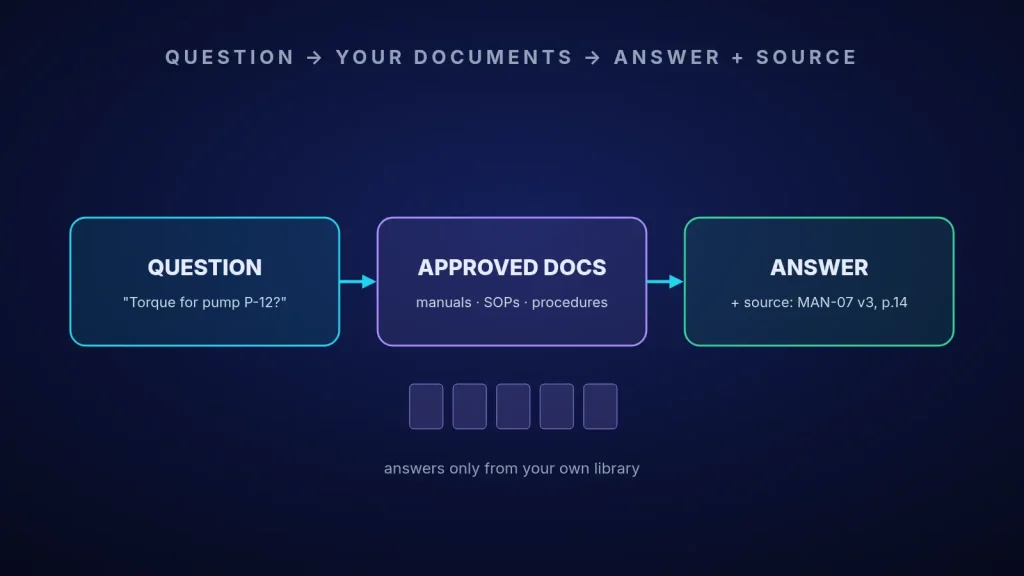
How a document assistant works, in plain language
A general chatbot answers from what it learned on the internet. That's exactly what you don't want on the shop floor. A RAG assistant works differently, in three steps:
- Retrieve: when someone asks a question, the system first searches your approved documents and picks the few passages that are most relevant.
- Generate: a language model writes a short answer using only those passages.
- Cite: the answer shows the document name, version and page, so the user can check the source with one click.
The idea was described by Lewis and colleagues in 2020, and it has become the most common pattern for company knowledge assistants because the model doesn't need to be retrained when a document changes. You update the document library, and the next answer uses the new version.
Worked example: a maintenance team and its manuals
The numbers below are an illustrative example, not data from a real company. Replace them with your own.
| Item | Example value |
|---|---|
| Technicians and planners who search documents | 40 people |
| Average time spent searching per person per day | 25 minutes |
| Working days per year | 250 |
| Search time per year | 40 × 25 × 250 ÷ 60 ≈ 4,170 hours |
| Realistic reduction with a good assistant (assumption) | 40% |
| Hours freed per year | ≈ 1,670 hours |
If an hour of a technician's time costs the company, for example, 15 dollars, that's about 25,000 dollars a year in time alone. But in a factory the bigger number is usually downtime: if faster access to the right procedure shortens even a few breakdowns on a bottleneck line by 20 minutes each, the value of the lost output can easily exceed the labour saving. Treat the 40% as a hypothesis to test in the pilot, not a promise.
How to run a first pilot, step by step
- Step 1 – Pick one team and one document set. For example, maintenance manuals and work instructions for one line. Small and clear beats big and vague.
- Step 2 – Clean the library before adding AI. Remove old versions and duplicates, and make sure every document has an owner and a version number. If the library is wrong, the assistant will be confidently wrong.
- Step 3 – Collect 50 real questions. Ask the team what they actually search for, and write down the correct answer and its source for each one. This becomes your test set.
- Step 4 – Choose where the data lives. Decide whether documents may go to a cloud service or must stay on your own servers. For sensitive technical documents, an on-premises or private deployment is often the right choice.
- Step 5 – Build and test against the 50 questions. Measure how many answers are correct, how many cite the right source, and how often the assistant correctly says "I don't know".
- Step 6 – Run it with real users for four to six weeks. Track search time, user feedback and wrong answers, then decide whether to expand to another team.
The payoff
The most valuable result isn't the chatbot itself. To make it work, you have to bring your procedures up to date, give each document an owner and decide which version is official. That discipline helps the whole organization, with or without AI. On top of that, new staff become productive faster, experienced people are interrupted less, and knowledge stays in the company. If you're looking for other practical starting points, my article on applied AI use cases in manufacturing compares several options.
Checklist for your first document-assistant pilot
- One team, one document set and one clear pain (search time, downtime, onboarding).
- Old versions and duplicates removed; every document has an owner and version.
- 50 real questions with correct answers and sources, written down before building.
- A clear decision on where data is stored and who can see which documents.
- Every answer shows its source; the assistant can say "I don't know".
- Safety-critical tasks always point to the official procedure.
- Baseline search time measured before the pilot, and again after it.
- A named owner who keeps the document library current.
Want to try this with your own documents?
If your teams lose time searching for procedures, or you're worried about knowledge leaving with experienced staff, I'd be glad to help. We can choose the right first document set together, build a realistic test with your own questions, and decide on a setup that keeps your data safe.
Contact me Read: applied AI use cases in manufacturing
Sources
- Lewis, P. et al. Retrieval-Augmented Generation for Knowledge-Intensive NLP Tasks, NeurIPS 2020.
- NIST. AI Risk Management Framework (AI RMF 1.0), 2023.
- OWASP. Top 10 for LLM Applications.